/ 08
Avocado
Desktop app · AI assistant
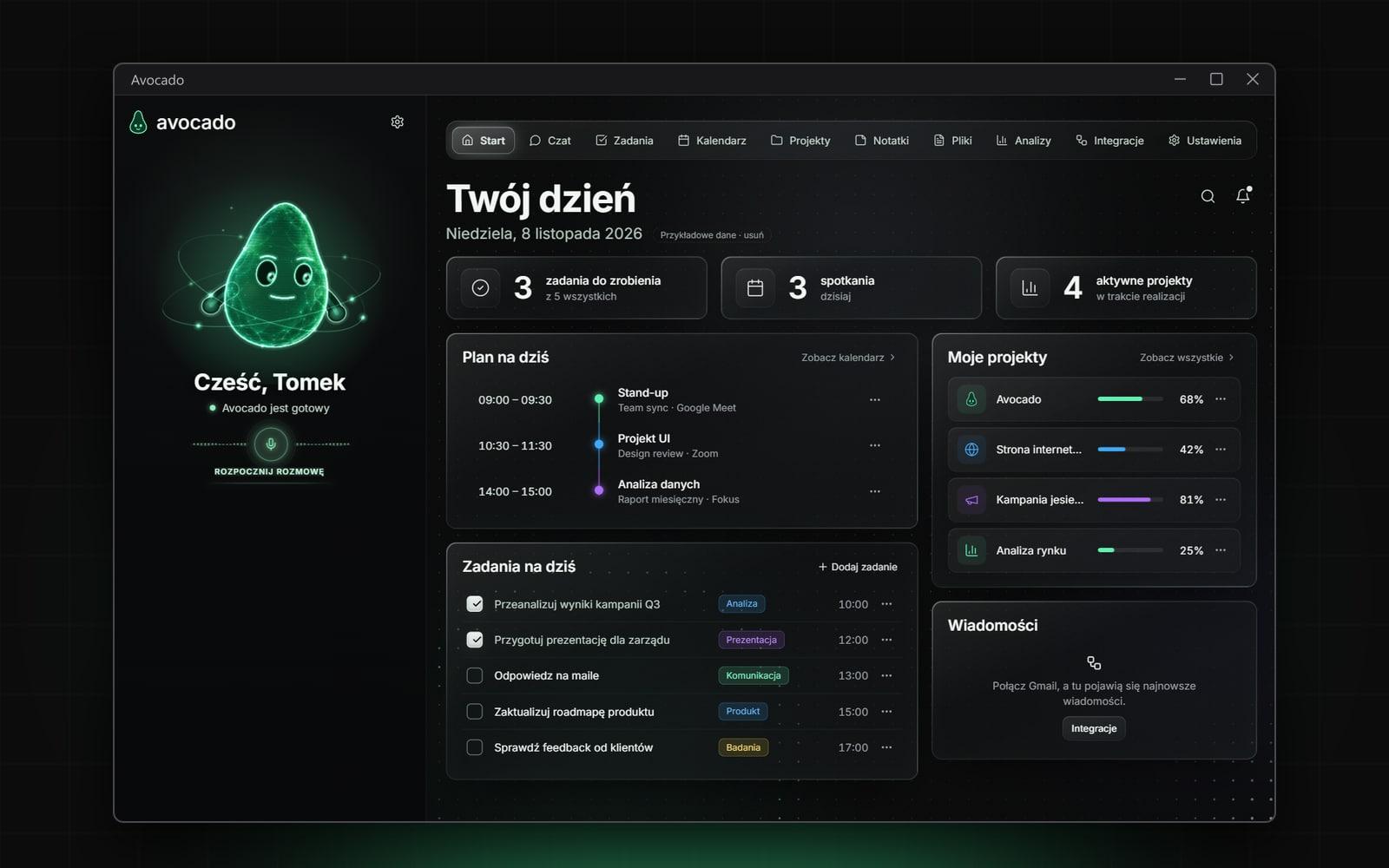
A personal desktop AI assistant: Claude, ChatGPT and Gemini in one chat, voice conversation, a living avocado avatar, and access to notes, tasks, calendar, email and files.
- Role
- Concept / Product / UX / UI / Built with AI
- Tools
- Electron · React · TypeScript · Vite · MCP · Whisper · Piper · Canvas
- Year
- 2026
- Reading
- 2 min
[ 01 ]
Challenge_
Every AI model lives in its own tab and knows nothing about your day: notes, tasks, email or files. Paid APIs add another bill, and an assistant with access to mail and calendar has to ask before it sends or deletes anything.
[ 02 ]
Audience_
One person who works with several AI models every day and wants them next to their notes, tasks and calendar — in one window.
[ 03 ]
Overview_
Avocado is a Windows AI assistant built for one person: one chat with three engines, and a whole day dashboard around it.
- 01Switch the engine mid-conversation: Claude, ChatGPT or Gemini.
- 02Next to it — the model and reasoning level.
- 03Claude and ChatGPT connect through their official CLIs, with no API costs.
- 04A living avatar that listens and talks back.
What's inside
- 01
Three engines, one chat
Claude, ChatGPT and Gemini, switchable mid-conversation along with the model and reasoning level.
- 02
No API bill
Claude and ChatGPT run through their official CLIs on existing subscriptions.
- 03
Day dashboard
Plan, kanban tasks, calendar and projects with milestones.
- 04
Notes and files
Markdown notes compatible with Obsidian, and files at hand.
- 05
Time analytics
Charts and insights on where the day goes.
- 06
Living avatar
An animated avocado that sits on the desktop, listens and talks back.
[ 04 ]
Process_
01Decision
Three engines, one conversation
Claude Code CLI and Codex CLI run in the background on subscriptions, Gemini through its API with its own tool loop — replies stream into the chat.
02Decision
One MCP server for every engine
notes, tasks, calendar, projects and AI memory, plus Gmail, Google Calendar and Drive, GitHub and Figma. Sending mail, calendar changes and deletions always go through an in-app consent dialog.
03Decision
Voice, local and free
whisper.cpp speech recognition, Polish Piper voices (ElevenLabs optional), and a conversation started by clicking the avocado on the desktop.
04Decision
A “Liquid Glass” look
translucent panels with blur and a glint that follows the cursor, an animated dot field behind, and a canvas avatar whose mouth moves as it speaks.
[ 05 ]
Gallery_
01 — Your day — plan, tasks and projects 02 — Chat with engine and model picker 03 — Tasks — kanban board 04 — Calendar — week view 05 — Projects and milestones 06 — Markdown notes, Obsidian-compatible 07 — Time analytics and insights 08 — Integrations and permissions
[ 06 ]
Outcome_
An everyday Windows tool: 10 screens on local data, three AI engines in one chat, voice conversation with a desktop avatar, and Google, GitHub and Figma integrations — data stays in a folder on the computer.
[ 07 ]
Details_
Tech & tools
- Electron
- React
- TypeScript
- Vite
- MCP
- Whisper
- Piper
- Canvas
Electron, React, TypeScript, Vite, motion, Model Context Protocol, whisper.cpp, Piper, pdf.js, mammoth, SheetJS. Notes and AI memory as Markdown files (Obsidian-compatible), keys and tokens encrypted with safeStorage. A personal-use app — the screenshots show sample data.
Next project
Kawunia